
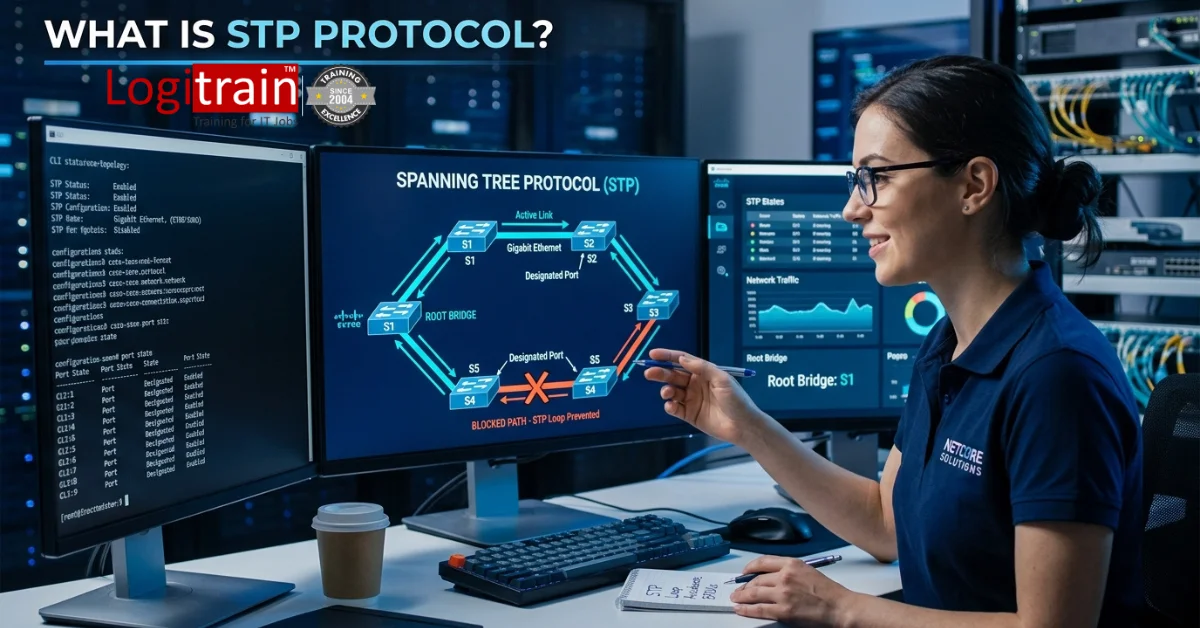

STP protocol is a Layer 2 network protocol that stops switching loops by blocking redundant paths and keeping one active path between Ethernet switches. It protects a network from broadcast storms, duplicate frames, and unstable MAC address tables. If a live path fails, STP opens a backup path and keeps traffic moving.
In case you are in charge of the office switches, campus networks, warehouse Wi-Fi uplinks, or branch connections throughout Australia, then STP will lie right at the core of your stable Ethernet design.
What is STP protocol?
STP stands for Spanning Tree Protocol. It runs on Layer 2 switches and creates a loop-free logical topology across a physical network that contains extra links for resilience.
STP derives its existence from IEEE 802.1D standard and consists of the following steps: sending BPDUs (Bridge Protocol Data Units) between switches; electing a root bridge; choosing optimal forwarding paths; blocking the remaining paths.
- STP prevents switching loops
- STP blocks redundant Layer 2 paths
- STP allows automatic failover
- STP keeps Ethernet networks stable
Example: A Melbourne office uses 3 access switches and 2 uplinks between floors for redundancy. Without STP, a single broadcast frame loops nonstop. With STP, one uplink forwards traffic and the other waits as backup.
Why does STP matter?
Redundant links improve uptime. They also create a serious problem when frames circle forever between switches. A network loop does not stay small. It spreads fast and crushes performance.
STP is necessary to prevent 3 problems:
- Broadcast storms
Broadcast traffic multiplies across the loop and consumes bandwidth. - Duplicate frames
Devices receive the same frame again and again, which breaks normal communication. - MAC table instability
MAC address will continue changing from port to port rapidly, leading to flooding and erratic behavior.
In practical terms, STP turns a risky physical design into a safe logical design. You still get redundancy, but you avoid the chaos that loops create in schools, hospitals, warehouses, and corporate offices.
How does STP stop loops?
STP builds a tree structure across all connected switches. A tree has no closed loop, so traffic has one active route between any two points.
The process follows 5 steps:
- Switches send BPDUs
Each switch shares identity and path information. - The root bridge is elected
The switch with the lowest bridge ID becomes the reference point. - Each non-root switch picks a root port
This is the best path back to the root bridge. - Each network segment picks a designated port
That port forwards traffic for the segment. - Extra paths are blocked
Redundant links stay available but do not forward traffic until needed.
The result is a loop-free topology with backup links ready for failover.
What are STP roles and states?
STP works best when you understand the main port roles and port states. These decide which interfaces forward traffic and which interfaces wait.
STP port roles
| Port role | What it does |
| Root port | Best path from a switch to the root bridge |
| Designated port | Forwarding port for a network segment |
| Blocked or alternate port | Backup path that does not forward user traffic |
STP port states
| Port state | Purpose |
| Blocking | Drops data frames and prevents loops |
| Listening | Processes BPDUs and prepares for forwarding |
| Learning | Learns MAC addresses but still does not forward user traffic |
| Forwarding | Sends and receives normal traffic |
| Disabled | Administratively down or inactive |
Classic STP takes time to move through these states. That delay protects the network during topology changes, but it slows recovery after a fault.
What is the STP election process?
The election process decides which switch controls the tree. That switch becomes the root bridge.
The switch with the least bridge ID number wins. Bridge IDs consist of:
- Priority value
- MAC address
If 2 switches share the same priority, the lower MAC address wins.
After that, every switch calculates the lowest-cost path to the root bridge. Path cost depends on link speed. Faster links get lower cost and usually win. This keeps traffic on the most efficient route.
Example
A business has 3 switches:
- Switch A priority: 4096
- Switch B priority: 32768
- Switch C priority: 32768
Switch A becomes the root bridge because it has the lowest priority. The other switches pick their shortest path back to A and block any extra loop path.
That is why network engineers set the core switch priority manually instead of leaving the election to chance.
Which STP versions are used?
The term STP often refers to more than one protocol version. The core idea stays the same, but speed and design differ.
1. STP
Classic IEEE 802.1D STP is the original standard. It works, but convergence is slow.
2. RSTP
Rapid Spanning Tree Protocol or IEEE 802.1w speeds up convergence and restores traffic much faster after a link change.
3. MSTP
Multiple Spanning Tree Protocol or IEEE 802.1s maps multiple VLANs to fewer spanning tree instances. It scales better in larger environments.
Quick comparison
| Protocol | Standard | Typical use |
| STP | 802.1D | Legacy environments |
| RSTP | 802.1w | Modern switched networks |
| MSTP | 802.1s | Larger VLAN-heavy networks |
Most modern business networks run RSTP or MSTP because recovery speed matters. In a busy office, that difference means fewer user complaints and less downtime for phones, printers, POS systems, and Wi-Fi access points.
When do networks need STP?
Any switched Ethernet network with redundant paths needs spanning tree protection. That includes:
- Office floors with dual uplinks
- School campuses with multiple edge switches
- Warehouses with resilient switch stacks
- Retail stores with backup links to core switches
- Data networks carrying voice, CCTV, and Wi-Fi traffic
A small office with one unmanaged switch does not rely on STP in the same way. A business with several managed switches and redundant cabling absolutely does.
In Australia, this matters for organisations that need uptime across branch offices, training labs, health sites, and logistics facilities. A single loop can bring down printing, file access, VoIP, and wireless roaming at once.
How do you configure STP well?
Good spanning tree design starts before the CLI. You choose where the root bridge sits, which uplinks forward traffic, and how VLANs move across the campus.
Use this 7-point checklist:
- Set the root bridge manually
Put it on the core or distribution switch. - Set a secondary root bridge
Pick the backup switch in the same tier. - Use RSTP for faster recovery
It reduces disruption during link changes. - Enable PortFast on end-device ports
PCs and printers connect faster and avoid unnecessary delays. - Enable BPDU Guard on access ports
It protects against rogue switches. - Document VLAN and uplink paths
Clear diagrams prevent accidental loops. - Test failover during maintenance windows
You confirm the actual path behaviour before a real outage happens.
If your team wants hands-on switching skills, explore IT networking courses in Melbourne to build practical knowledge in STP, VLANs, routing, and switch security.
What mistakes break STP?
STP problems often come from poor design rather than bad hardware. These mistakes trigger slow failover, unstable traffic paths, or full network outages.
Common errors
- Leaving root bridge election to default values
- Plugging unmanaged switches into access ports without controls
- Missing BPDU Guard on user-facing ports
- Using inconsistent VLAN settings across trunks
- Creating physical loops during office moves
- Forgetting to review spanning tree after switch replacement
Real example
A small warehouse adds an extra patch lead between 2 edge switches during a printer move. Both links stay active. Broadcast traffic floods the LAN, scanners drop sessions, and label printers stop responding. STP blocks the extra path and prevents that outage when configured correctly.
How does STP compare with RSTP?
People often ask whether STP and RSTP are the same thing. They solve the same problem, but RSTP does it faster and with a cleaner state model.
Here is the direct difference:
- STP blocks loops and converges slowly
- RSTP blocks loops and converges quickly
Classic STP often takes 30 to 50 seconds to settle after a topology change. RSTP cuts that time sharply, which keeps disruptions shorter in live business networks.
If you run managed switches from modern vendors, RSTP usually stands as the better default unless a legacy environment forces classic STP compatibility.
What role does STP play in training?
STP is a core topic in networking training courses because it teaches three things at once:
- How Layer 2 switching actually works
- Why redundancy needs control logic
- How design choices affect real uptime
Students remember STP once they see it in a lab. One extra cable looks harmless until a loop starts. That practical exercise turns theory into a real troubleshooting skill.
If you want structured training in switching, routing, and cyber security, contact Logitrain on 1300 899 510 or visit Suite 3, 53 Dryburgh Street, West Melbourne VIC 3003.
What are the key takeaways?
STP protocol prevents Layer 2 loops by electing a root bridge, selecting active forwarding paths, and blocking redundant links. That single function protects networks from broadcast storms, duplicate frames, and MAC table instability.
For most modern environments, the practical path is clear:
- Use RSTP where possible
- Define the root bridge manually
- Protect edge ports with BPDU Guard
- Test failover before production issues expose weak design
That approach keeps networks stable, predictable, and easier to troubleshoot.
FAQs
1) What does STP stand for in networking?
STP stands for Spanning Tree Protocol. It is a Layer 2 protocol that prevents loops between Ethernet switches by blocking extra paths and keeping one active route.
2) What is the main purpose of STP?
The main purpose of STP is to stop switching loops. It protects the network from broadcast storms, duplicate frames, and MAC address table instability.
3) What is a root bridge in STP?
A root bridge is the main reference switch in the spanning tree. All other switches calculate their best path back to that switch, which helps create a loop-free topology.
4) What is the difference between STP and RSTP?
STP and RSTP do not create loops, but RSTP is more efficient and can converge faster during any change in the network. This makes recovery time shorter for failure cases and rebooting.
5) Does STP work with VLANs?
Yes, STP works in VLAN-based networks. In larger environments, administrators often use PVST variants or MSTP so VLAN traffic follows controlled spanning tree logic across trunks and access switches.
6) Is STP still relevant today?
Yes, STP remains relevant in modern switched networks. Even with advanced switching features, Layer 2 redundancy still needs loop prevention, especially in offices, campuses, and branch networks.